
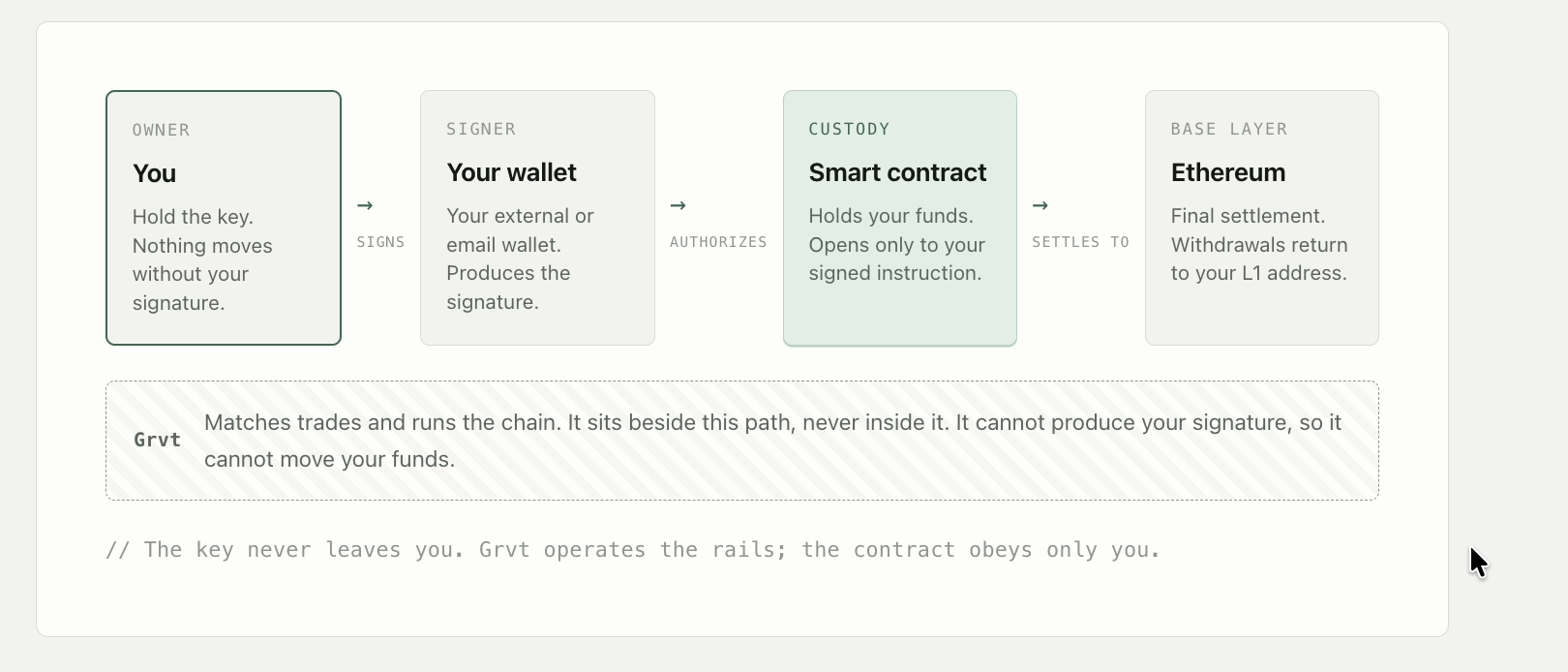
Self-custody means you hold your own funds, and no one, including Grvt, can move them without you. If you have ever been unsure exactly how that works here, this is a plain-language walkthrough: where your money actually sits, what signs for it, and how withdrawals work. The short version is your funds sit in smart contracts on-chain that open only when your key signs. Grvt never holds your key. So it cannot move your money, spend it, or send it anywhere. Only you can.
You're not missing something obvious
If this was never clear, that's on us. If you've held funds here without being sure where they actually sit, you're not careless and you're not alone. Crypto throws three different words at you as if they mean the same thing: your signer, your wallet, and the smart contract. They don't. Almost all the confusion, and the worry that comes with it, disappears the moment you separate them.
There's really just one distinction to hold onto: the thing that authorizes a move is separate from the place the funds actually sit. Get that, and the rest is detail.
The signer (authorizes)
Proves it's you. Your signer holds a private key and produces a signature that says "I approve this." It does not hold your balance. It holds the authority to move it, and only you have it.
The wallet (where your key lives)
The home for your signer. On Grvt that is either your own external wallet like MetaMask, or an email wallet created for you when you sign up with email. Both are just places your key is kept. Both belong to you.
The smart contract (where funds sit)
Where the money actually is. Your funds live in audited smart contracts on-chain, not on a Grvt balance sheet. The contract releases them only to an instruction validly signed by you.
The guarantee that matters most - only your key moves your funds. The core of self-custody is simple. A withdrawal is an instruction signed by your key, and the smart contract sends your funds back to your own wallet. Grvt cannot produce that signature, so it cannot move your money, redirect it, or spend it. The authority to move your funds never leaves your hands.
Follow the money: the custody path, start to finish
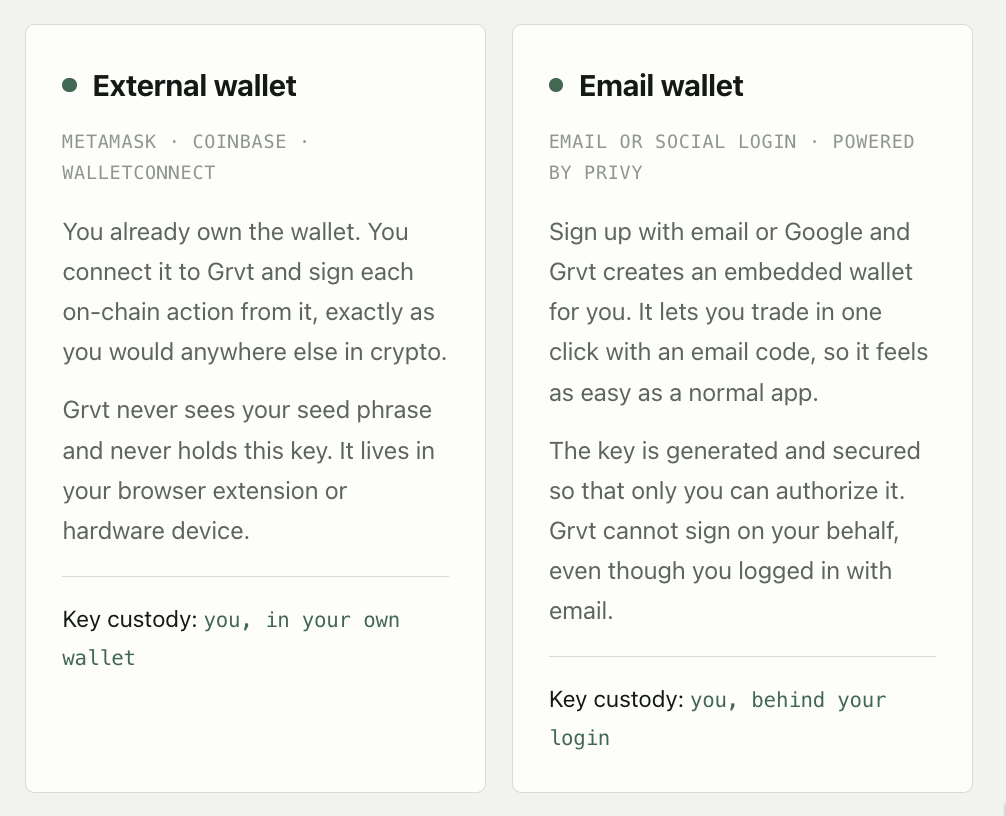
Two ways to hold your key: external wallet or email wallet; both are yours
Grvt has two kinds of users. The difference is only where your key is kept, not who controls it. In both cases the answer to "who can sign?" is: only you.
A closer look at the email wallet and Privy
The email wallet is powered by Privy, wallet infrastructure used across crypto to give people a real self-custodial wallet without a seed phrase to memorize. When you sign up with email or social login, Privy creates a standard crypto account for you, the same kind of account MetaMask holds. It has its own private key and its own address, and it belongs to you.
What makes it safe is how that key is stored. The moment your wallet is created, the private key is generated inside a secure, hardware-isolated environment (a TEE) and immediately split into separate shares using Shamir's Secret Sharing. No single party ever holds the whole key, not Grvt and not Privy. When you sign a withdrawal, the shares are briefly reassembled inside that secure enclave, the transaction is signed, and the reconstructed key is destroyed right away.
So how is this different from MetaMask? Only in where the key lives. MetaMask keeps your key in a browser extension that you manage with a seed phrase. The email wallet keeps it sharded across secure infrastructure behind your login. In both cases the wallet is self-custodial: the only thing that can authorize a move is your key, and only you can trigger it.
You are never locked into the email wallet. You can export your private key at any time and load it into another wallet like MetaMask or Phantom. The export is designed so that neither Grvt nor Privy can read your key while it happens. To do it, open Privy home and follow the steps in the Grvt Help Center.
Why your Grvt balance will not appear in Privy or MetaMask?
This is the part that worries people, so it's worth being precise. If you export your key, or view your wallet in Privy's own interface, you will not see your Grvt balance there. Nothing is missing. Privy and MetaMask only display balances for the blockchains they actively index, and neither of them indexes Grvt's chain. Their job with Grvt is narrow: hold your key and sign the transactions that let you withdraw. They are the signer, not the ledger. Your Grvt balance lives on Grvt's chain and shows up in the Grvt app. For the exact same reason, these wallets cannot show your Hyperliquid positions either. A wallet only surfaces what it indexes.
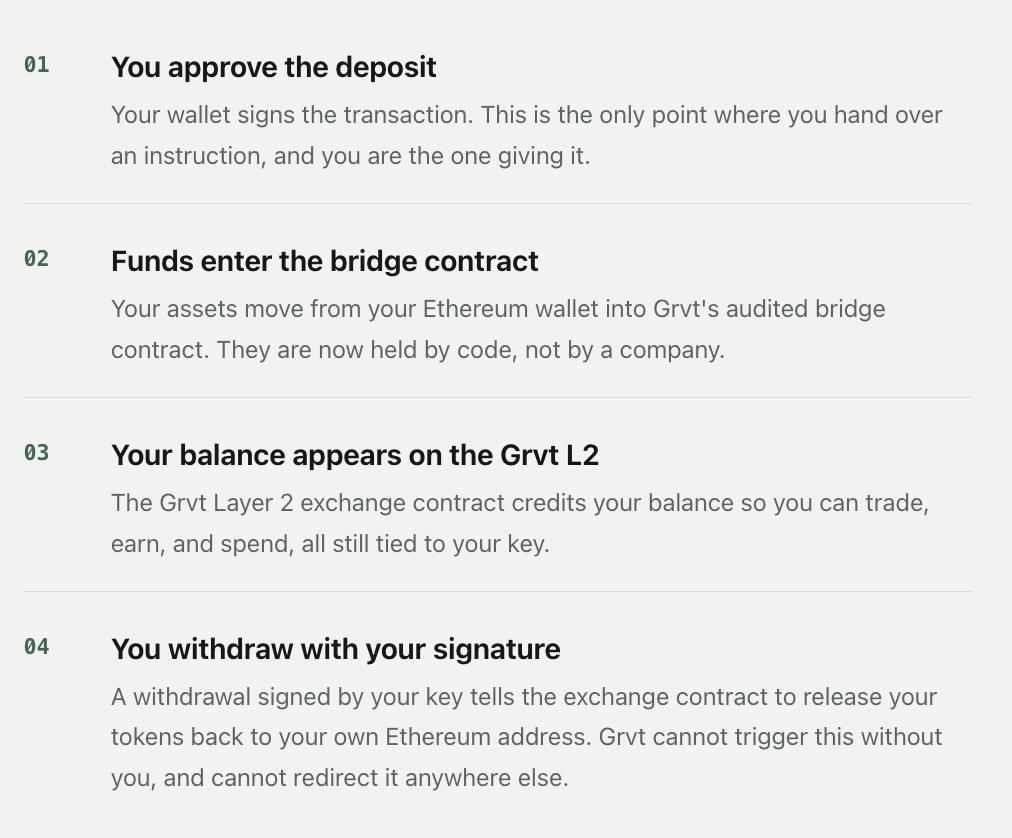
A deposit, step by step: what happens when you fund your account
This is the moment people worry about most, so here's exactly what a deposit does. It's an ordered sequence, and your key is required at the start.
The bottom line: you should be able to sleep at night
You can keep most of your assets here and still hold them yourself. The funds sit in smart contracts. The authority to move them sits with your key. Grvt runs the exchange around both and is built so it cannot reach in, even if it wanted to.
So the question this article set out to answer what self-custody of funds means on Grvt, has a clean answer: your funds move only when your key signs, and your key is yours alone. That is what self-custody means here. Not a slogan, a design you can check.
This article explains how self-custody works on Grvt for a general audience. As with any on-chain system, smart contracts carry inherent risks; these, along with the full terms of use, are set out in Grvt's Terms and Conditions. For the underlying design, see Grvt's technical documentation.